
Introduction
Tungsten Replicator has always been the engine powering data replication in Tungsten Clustering deployments. Traditionally, standing up a replicator meant going through the full tpm installation process on a dedicated Linux host — provisioning, configuring, and maintaining a physical or virtual machine for a single replication role.
With the upcoming Tungsten 8.0.4 release, we are introducing a first-class Docker distribution of Tungsten Replicator as a standalone package. No tpm. No host-level installation. Just a container image, a configuration file, and docker compose up.
This post is a preview of what is coming — walking through the design, the configuration, and what it will look like in practice.
What Problem Does This Solve?
There are many situations where you need a Tungsten Replicator running independently from a full Tungsten Cluster installation:
- Offload reads to a satellite database - replicate events from a Tungsten-managed cluster to a standalone MySQL instance used for analytics, reporting, or a different application tier.
- Cloud-native or Kubernetes environments - teams already running containerized workloads do not want to treat the replicator as a special snowflake requiring bare-metal provisioning.
- Rapid prototyping and testing - spin up a replicator in seconds, tear it down cleanly without touching any host-level state.
- Reduced operational overhead - image-based deployments make upgrades, rollbacks, and horizontal scaling trivial.
The first supported topology in this release is cluster-extractor: a replicator that connects to an existing Tungsten Cluster as its source and applies transactions to a MySQL database.
Tungsten Replicator vs. MySQL Native Replication
MySQL’s built-in replication is designed to ship binary log (binlog) events from a MySQL primary to one or more replicas. It is a solid default for straightforward topologies, but it is tightly coupled to MySQL’s binlog format and replication semantics, and it offers limited flexibility when you need to reshape, route, observe, or operationalize replication beyond “primary → replicas.”
Tungsten Replicator is a standalone replication engine that consumes MySQL changes (and other supported sources), normalizes them into Tungsten’s Transaction History Log (THL), and then applies them to one or more destinations. That separation between extract → transport → apply is what makes Replicator useful not only inside Tungsten Clustering, but also as a general-purpose replication layer.
Key benefits you get with Tungsten Replicator (beyond native MySQL replication):
- Decoupled, store-and-forward change transport (THL): THL provides durable buffering and a consistent change stream that can survive transient outages and supports flexible fan-out patterns.
- Topology flexibility: Run extractors, relays, and appliers in different places (including “outside the cluster” consumers), enabling hub/spoke, multi-site relay, and downstream feeds without redesigning your source cluster.
- Filtering and transformation pipelines: Selectively replicate schemas/tables, rewrite or map objects, and adapt events for downstream use cases (analytics, reporting, app-tier read copies, etc.) with pipeline stages rather than application changes.
- Heterogeneous and “bridge” use cases: Replicate from a Tungsten-managed source stream to standalone databases (or other supported targets) as an integration/egress mechanism—not just as a MySQL HA feature.
-
Operational visibility and control: Replicator exposes rich runtime status and control surfaces (e.g.,
trepctl, REST API, Prometheus metrics) so you can monitor lag, health, and throughput and automate operational workflows.
In short: MySQL replication is a database feature; Tungsten Replicator is an independent replication service with a pluggable pipeline and durable change-log that can be deployed inside or outside a cluster—making it a stronger fit when replication is part of a broader data movement, integration, or multi-environment strategy.
Architecture Overview
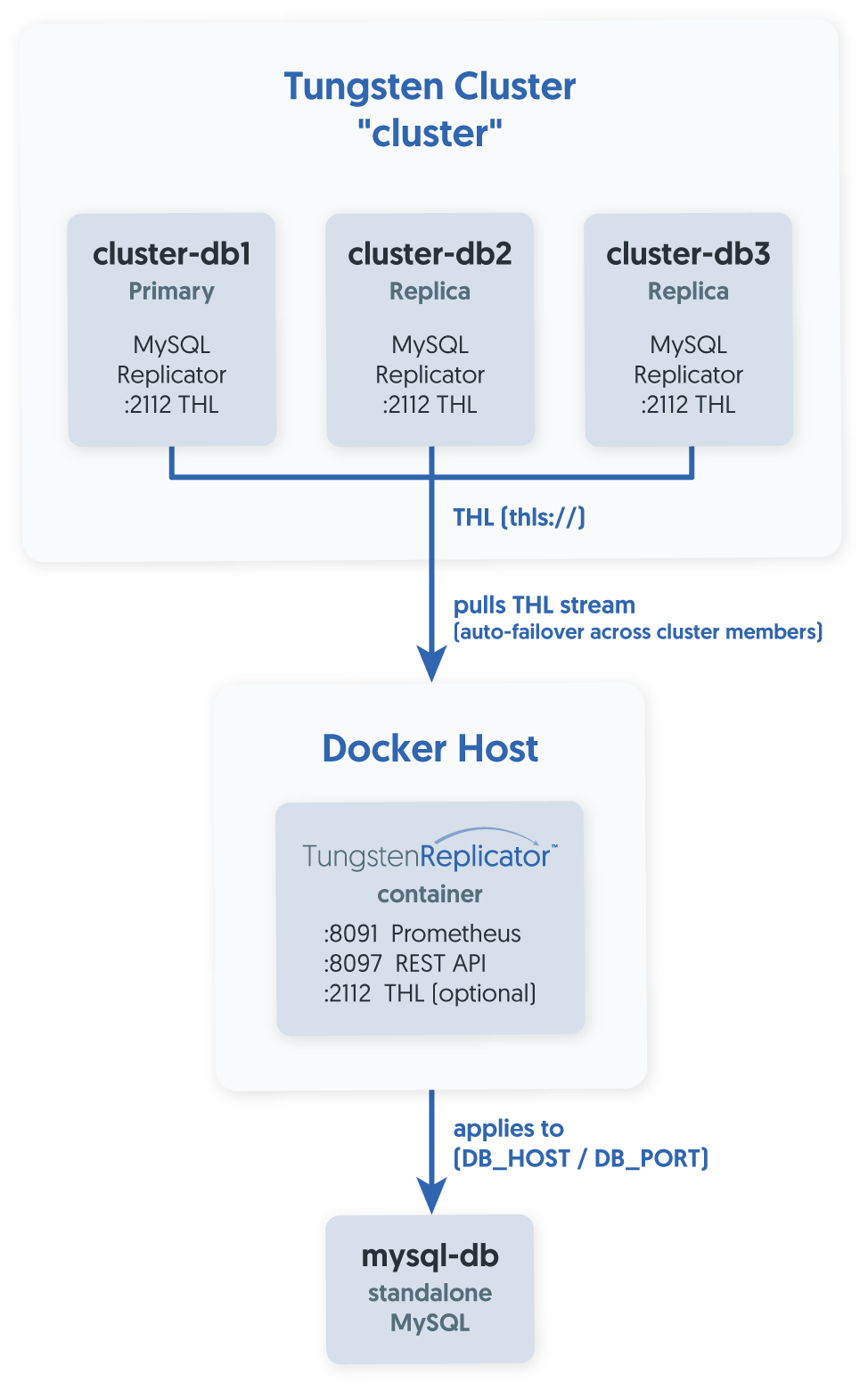
The Docker replicator runs as a self-contained container. It:
- Waits for the destination MySQL to become reachable before starting.
-
Reads its configuration from a mounted
tungsten.inifile — the same INI format used elsewhere in Tungsten, no new syntax to learn. - Persists THL and dynamic state on the host filesystem via Docker volumes, so the replicator survives container restarts and upgrades without losing position.
-
Exposes standard ports — the Prometheus metrics exporter on
8091and the REST API on8097— exactly as a traditionally installed replicator would.
The container is based on eclipse-temurin:25-noble and ships everything the replicator needs, including the MySQL client binaries. No external dependencies are required on the host beyond Docker itself.
What's in the Package?
When you extract the replicator Docker package (tungsten-replicator-docker-<VERSION>-<ARCH>.tar.gz), you get:
tungsten-replicator-docker-8.0.4-10/
├── .env                          # Image name and version variables for compose
├── compose.yaml                  # Ready-to-edit Docker Compose service definition
├── conf/
│   └── tungsten.ini.clusterextractor # Configuration template for cluster-extractor topology
├── security/
│   └── README.md                 # Step-by-step SSL/TLS security setup
├── tungsten-replicator-8.0.4-10-<arch>.tar  # The Docker image tarball
└── README.md                     # Full installation guide
Packages are provided for both amd64 and arm64 architectures. There is no registry dependency — the image tarball is included in the package and loaded locally with `docker load`.
Step-by-Step: Getting a Cluster-Extractor Replicator Running
Load the Docker Image
tar xvzf tungsten-replicator-docker-8.0.4-10-amd64.tar.gz
cd tungsten-replicator-docker-8.0.4-10
docker load --input tungsten-replicator-8.0.4-10-amd64.tar
docker images
Configure compose.yaml
The provided compose.yaml needs a few values filled in to match your environment:
| Variable | Purpose |
|---|---|
DB_HOST
|
Hostname or IP of the destination MySQL instance |
DB_PORT
|
Port of the destination MySQL (typically 3306)
|
container_name
|
Name shown in docker ps — use something meaningful like replicator-alpha
|
hostname
|
The hostname the replicator will identify itself as |
extra_hosts
|
Optional host-to-IP mappings injected into /etc/hosts inside the container
|
The extra_hosts section is particularly useful when the source cluster nodes are not resolvable by DNS from inside the container. Simply uncomment and list each hostname-to-IP mapping:
extra_hosts:
  - "cluster-db1:192.168.30.82"
  - "cluster-db2:192.168.30.83"
  - "cluster-db3:192.168.30.84"
The volumes section mounts four paths from the host into the container:
volumes:
  - ./conf/tungsten.ini:/etc/tungsten/tungsten.ini   # your configuration
  - ./thl:/opt/continuent/thl                        # THL storage (persisted)
  - ./state:/opt/continuent/tungsten/tungsten-replicator/conf/dynamic  # dynamic state
  - ./security:/opt/continuent/share                 # security keystores
All four directories are created automatically by Docker Compose on first run if they do not exist yet.
Write Your tungsten.ini
Copy the provided template and edit it:
cp conf/tungsten.ini.clusterextractor conf/tungsten.iniThe template for a cluster-extractor looks like this:
[defaults]
# Set to false (or remove) to enable SSL/TLS between replicator and cluster
disable-security-controls=true

[cluster]
topology=cluster-alias
members=db1,db2,db3
master=db1

[standalone_replication]
topology=cluster-slave

relay=replicator-alpha       # Must match the container_name in compose.yaml
relay-source=cluster

replication-user=tungsten
replication-password=secret

# replication-host=localhost  # Uncomment if MySQL is on a different host
# replication-port=3306       # Uncomment to use a non-default port

log-slave-updates=true
The key settings to understand:
-
[cluster]— describes the source Tungsten Cluster: its topology, the list of member nodes, and which one is currently the primary. -
[standalone_replication]— describes the local replication service. Thetopology=cluster-slavevalue is what tells the replicator it is acting as an external consumer of an existing cluster's THL stream. -
relay— must match thecontainer_nameandhostnameincompose.yaml; this is the name the replicator uses to identify itself on the THL network. -
relay-source— the name of the[cluster]section to pull from.
Launch
docker compose up -d
docker ps
The container will wait up to 60 seconds for the destination MySQL to become available before starting the replication service. This means you do not need to worry about startup ordering in your environment.
Verify Replication
Connect to the running container and check replicator status:
docker exec -it replicator-alpha bash
trepctl status
When the replicator is healthy you will see state: ONLINE and a relativeLatency that counts up from a small number of seconds. The pipelineSource field shows which cluster node the replicator is currently pulling THL from — it will automatically fail over to another cluster member if that node becomes unavailable.
Enabling Security (TLS)
By default, the template ships with disable-security-controls=true for quick bring-up. For production deployments, you will want to enable TLS between the replicator container and the source cluster.
Step 1: Set disable-security-controls=false (or remove the line) in conf/tungsten.ini.
Step 2: Copy the following files from /opt/continuent/share on any live, security-enabled node of the source cluster into the security/ directory of your package:
-
passwords.store -
tungsten_keystore.jks -
tungsten_truststore.ts -
tungsten_thl_keystore.jks -
tungsten_thl_truststore.ts
That is all that is needed. The security/ directory is mounted into the container at /opt/continuent/share, which is where the replicator looks for its keystores.
Securing the MySQL Connection
If the destination MySQL requires encrypted client connections, a few extra steps are needed to import the MySQL TLS certificates into the Tungsten keystores.
Retrieve from the destination MySQL host:
-
ca.pem -
client-cert.pem -
client-key.pem
Then import them:
PASSWD=tungsten   # change if your keystore password is different
openssl pkcs12 -export \
  -in client-cert.pem -inkey client-key.pem \
  -out client.p12 -name mysql_dest \
  -passout pass:$PASSWD

keytool -importkeystore -noprompt \
  -srckeystore client.p12 -destkeystore security/tungsten_keystore.jks \
  -srcalias mysql_dest -destalias mysql_dest \
  -srcstoretype pkcs12 -deststoretype JKS \
  -srcstorepass $PASSWD -deststorepass $PASSWD \
  -srckeypass $PASSWD -destkeypass $PASSWD

keytool -import -noprompt -trustcacerts \
  -alias mysql_ca_dest -file ca.pem \
  -keystore security/tungsten_truststore.ts \
  -storepass $PASSWD -keypass $PASSWD
If the global disable-security-controls=true setting is in place (i.e., replicator-to-cluster TLS is off) but you still want encrypted connections to MySQL, uncomment datasource-enable-ssl=true in tungsten.ini.
Monitoring
The container exposes a Prometheus metrics endpoint on port 8091. Once the replicator is running, point your Prometheus scrape config at http://<host>:8091/metrics to collect standard replicator metrics including applied sequence number, latency, and pipeline state.
The REST API on port 8097 provides programmatic access to replicator state and operations, consistent with any other Tungsten Replicator deployment.
Lifecycle Operations
Stop the container
docker stop replicator-alphaStart it again
docker start replicator-alpha
Because the THL and dynamic state are stored in host-mounted volumes (./thl/ and ./state/), the replicator resumes exactly where it left off — no resync needed.
Upgrade to a new version
Load the new image, update IMAGE_VERSION in .env, then:
docker compose down
docker compose up -d
The volumes are preserved across compose down / compose up cycles.
Remove the container and clean up
# Must be run from the original installation directory
docker compose down -vdocker compose down -v also removes named volumes. If you want to preserve THL history for a future reinstall, back up the ./thl/ and ./state/ directories first.
What Is Next
Everything described in this article — the Docker package, the compose.yaml, the tungsten.ini templates, the security integration, the Prometheus endpoint — is coming in Tungsten 8.0.4.
The initial release will support the cluster-extractor topology: a containerized replicator pulling a THL stream from a Tungsten Cluster and applying it to a standalone MySQL database. That is the use case we are launching with, and it already covers a large number of real-world scenarios.
Support for additional topologies will be evaluated as concrete use cases are identified.
Summary
The Tungsten Replicator Docker package in 8.0.4 makes it straightforward to run a production-grade replicator without any host-level Tungsten installation.
The workflow is:
-
Load the image with
docker load -
Edit
compose.yamlwith your hostnames and ports -
Copy and fill in
tungsten.inifrom the provided template -
Run
docker compose up -d

Comments
Add new comment