A Quick-Reference Guide for Tungsten Operations
Best Practices
Check back often for updates to this page
Getting Support and Training
When in doubt during a Production outage or problem, open an Urgent or High support case at https://continuent.zendesk.com/requests/new and use the following procedures to create the case:
Please visit our extensive library of training videos to learn at your own pace from our team of experts:
Search the docs at https://docs.continuent.com/
Use the
tungsten_send_diagcommand to automatically generate and upload a Tungsten diag file
Deployment Best Practices
How Do I Get Started?
You will work with Continuent Support who will guide you through the process below
Verify that all Prerequisites have been satisfied
Sign up on our download portal and wait for an email confirming your activation
Download the software package(s) you want
Decide the type of install you want
INI-based: maintain a config file on each node and perform install and update on every node, so ssh used
Staging-based: maintain a configuration on a single node and perform install and update once on this selected “staging server”, password-less ssh access required from the “staging server” host to every node in every cluster you want to manage from the staging server host
Decide the level of security you want
Non-Secure - do not use SSL to encrypt the cluster communications, set
disable-security-controls=trueSecure - use SSL to encrypt the cluster communications, set
disable-security-controls=falsehttps://docs.continuent.com/tungsten-clustering-7.0/deployment-security.html
Create the desired configuration, usually aided by Continuent support
Ensure
install=trueEnsure that
profile-script=has been specified for the selected Tungsten OS user path, normally “tungsten” to ensure that the env is loaded properly
Create the database nodes with MySQL Server running on all nodes
Optionally seed the full dataset to all nodes
Become the Tungsten OS user via sudo, for example:
sudo su - tungstenCopy the software package to /opt/continuent/software (or some other place recorded in your config)
Extract the tarball
cdto the new dirOptionally execute the validation step with
tools/tpm validate -iExecute the installation with
tools/tpm install -iOnce the install is done on all nodes, refresh the env by logging out of the tungsten OS user shell, then log back in to load the new env
For INI-based installs, pick one node and copy the keys from
/opt/continuent/share/to all other nodes.If you have password-less SSH enabled between the nodes, use the
tpm copy-keyscommand, as of v7.0.3For v7.0.0 and onwards, do this step even if you have a non-secure deployment and have set
disable-security-controls=truehttps://docs.continuent.com/tungsten-clustering-7.0/deployment-security-enabling-ini.html
Start the cluster by calling
startallon every nodeCheck the cluster status using
echo ls | cctrlcommand on one or more nodes, do at least once per cluster for Composite topologiesValidate the cluster with
cctrl> cluster validateValidate the cluster topology with
cctrl> cluster topology validatefrom the global datasourceUse
cctrl> cluster heartbeatto verify that replication is working on all nodesthis will insert a new seqno on the Primary which will then be replicated to all downstream replicas.
Check the
Progress=number incctrl> lsto confirm
Once your cluster is up and running, please strongly consider using our browser-based GUI, the Tungsten Dashboard
Docs for the Tungsten Dashboard are here: https://docs.continuent.com/tungsten-dashboard-1.0/index.html
If you would like help with the Dashboard installation, please open a support case at https://continuent.zendesk.com/requests/new
Configuration
You always need an odd number of nodes in a cluster. Connector-only nodes do not count, only nodes with a Manager.
The standard install path for Tungsten Clustering is
/opt/continuentand/opt/replicatorfor the standalone Tungsten ReplicatorThe standard location for storing the Tungsten configuration file is
/etc/tungsten/tungsten.inihttps://docs.continuent.com//tungsten-replicator-7.0/cmdline-tools-tpm-ini-format.html
When creating a configuration, use the output of the
hostnamecommand to populate the nodename entries - the values inside the INI must match thehostnameoutput, so if you are using short hostnames, then use the short name inside the INI, and if yourhostnamecommand returns the FQDN, then use the FQDN in the INI file
For OS’s with systemd, you must include
install=trueand keep that setting so that updates preserve the system state for Tungsten processesEnsure that the
binlog-formatis defined in yourmy.cnfThe default setting is
binlog-format=MIXEDUse
binlog-format=ROWfor Composite Active/Active (CAA) clusters, also for any cluster that will be feeding a non-MySQL target like Vertica
It is imperative that the open files limit for both the Tungsten and MySQL OS users be increased
https://docs.continuent.com/tungsten-clustering-7.0/prerequisite-host.html#prerequisite-host-user
For older OS’s where the
/etc/init.d/directory is in use, edit the/etc/security/limits.conffile; check withulimit -aNOTE: Older OS’s REQUIRE TABS, not Spaces in the
/etc/security/limits.conffile
If your OS uses
systemdandsystemctlthen you must configure the proper MySQL-specific service file in the/etc/systemd/system/directory and verify thatLimitNOFILE=infinity
Use
/etc/hosts, NOT DNS - if DNS fails, so will the entire cluster!https://docs.continuent.com/tungsten-clustering-7.0/prerequisite-host.html#prerequisite-host-network
Ensure that
/etc/nsswitch.confis set tohosts: files dns
Make sure that the required ports are open in all firewalls and iptables rules, check with
iptables -LActive witness nodes that run Manager only can provide the odd node when needed
it is important that
enable-active-witnesses=truegoes into each individual cluster section, NOT the default sectionthe witness node must be listed under the
members=property
The use of ORM/Hibernate will prevent automatic read/write splitting by the Connectors as Hibernate will execute all reads within transactions. The Connectors are unable to inspect statements within transactions and therefore all transactions will always be directed to a Primary node.
The use of Triggers needs to be handled very carefully because Tungsten does not automatically disable triggers on the Replicas when using Row-based replication, which is possible when using MIXED, the recommended default for Clustering (except for CAA, which should use ROW - see the section below “CAA Facts and Best Practices”). Please see the online documentation for more details on how to address this situation: http://docs.continuent.com/tungsten-clustering-6.1/troubleshooting-known-issues-triggers.html
Updates/Upgrades
When doing INI-based upgrades, just place the cluster in maintenance mode and issue the upgrade on all nodes at the same time
https://docs.continuent.com/tungsten-clustering-7.0/cmdline-tools-tpm-ini-upgrades.html
As long as the cluster is in maintenance mode then nothing needs to be shunned to perform the software upgrade
The only potential impact would be a momentary pause in replication as the replicators are restarted
The database is not restarted or touched
Performing the upgrade without a switch is actually less impactful as you do not need to worry about connections being terminated and re-routed to the new primary
If the connectors are on the same host then simply add --no-connectors to the tpm update command, and then issue tpm promote-connector at an appropriate time to restart the connector. At that point any in-flight connections will be terminated, but since this is under your control you can mitigate the impact by scheduling the restart accordingly.
Always use
tools/tpm update --replace-releasefrom the extracted software directory when upgrading version
Security
There is excellent documentation about implementing security at https://docs.continuent.com/tungsten-clustering-7.0/deployment-security-enabling.html
Setting the “umbrella”
tpmoptiondisable-security-controls=falsesets the following othertpmoptions for you: --rmi-ssl=true, --thl-ssl=true, --rmi-authentication=true, --jgroups-ssl=true, --datasource-enable-ssl=true, --connector-ssl=true, --connector-rest-api-ssl=true, --manager-rest-api-ssl=true, --replicator-rest-api-ssl=trueAs of v7.1.0 the
tpm certcommand handles all security operations for TungstenUse one of the below openssl commands to view multiple certificates stored in the same file:
while openssl x509 -noout -text; do :; done < fullchain.pemopenssl crl2pkcs7 -nocrl -certfile fullchain.pem | openssl pkcs7 -print_certs -text -noout
Some useful AWS CLI commands:
Add inbound rule(s) for a security group ID:
shell> aws ec2 authorize-security-group-ingress --group-id sg-NNNNNNNN --protocol tcp --port 80 --cidr '0.0.0.0/0'Delete inbound rule(s) for a security group ID:
shell> aws ec2 revoke-security-group-ingress --group-id sg-NNNNNNNN --protocol tcp --port 80 --cidr '0.0.0.0/0'List security groups by security group ID:
shell> aws ec2 describe-security-groups --output json | jq -r '.SecurityGroups[]|.GroupId+" "+.GroupName'List inbound rules for a specific security group ID:
shell> aws ec2 describe-security-groups --group-ids sg-NNNNNNNN --output json | jq -r '.SecurityGroups[].IpPermissions[]|. as $parent|(.IpRanges[].CidrIp+" "+($parent.ToPort|tostring))'
Topologies
Topologies, Defined
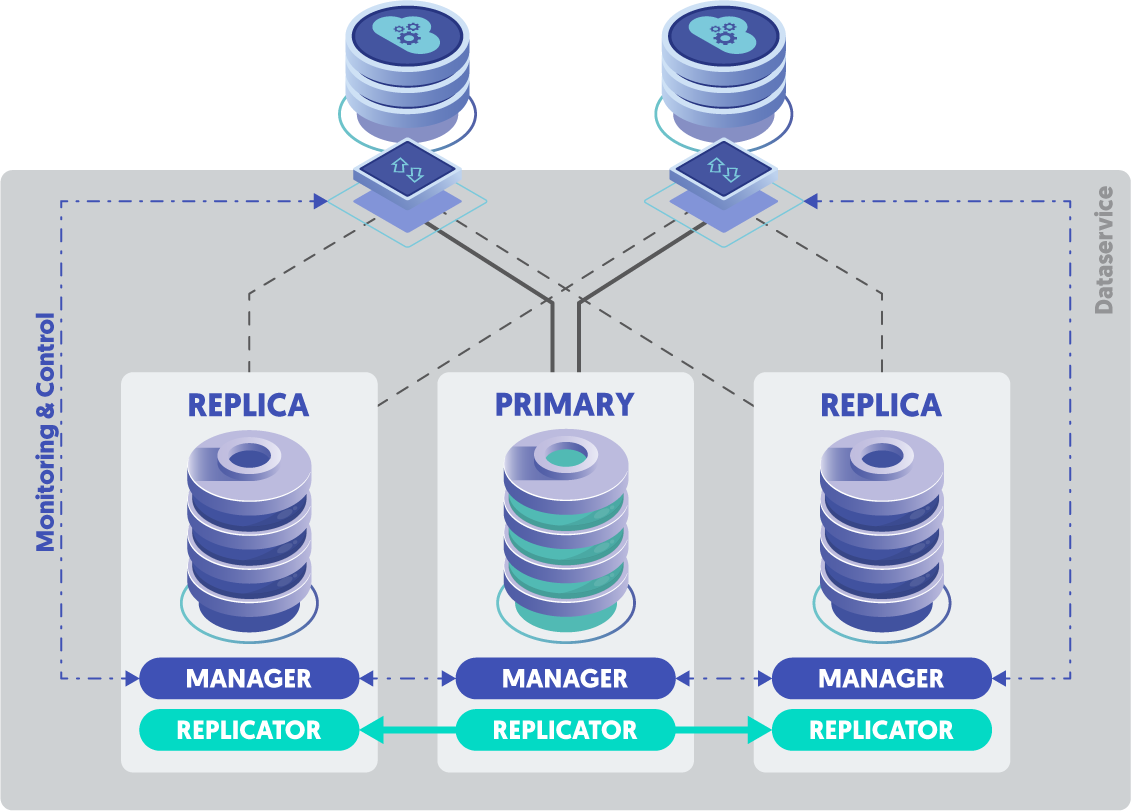
STD
Standard 3-node cluster
One single cluster, consisting of three or more nodes.
All clusters must have an odd number of nodes to establish voting quorum for failovers.
https://docs.continuent.com/tungsten-clustering-7.0/deployment-primaryreplica.html
CAP
Composite Active/Passive
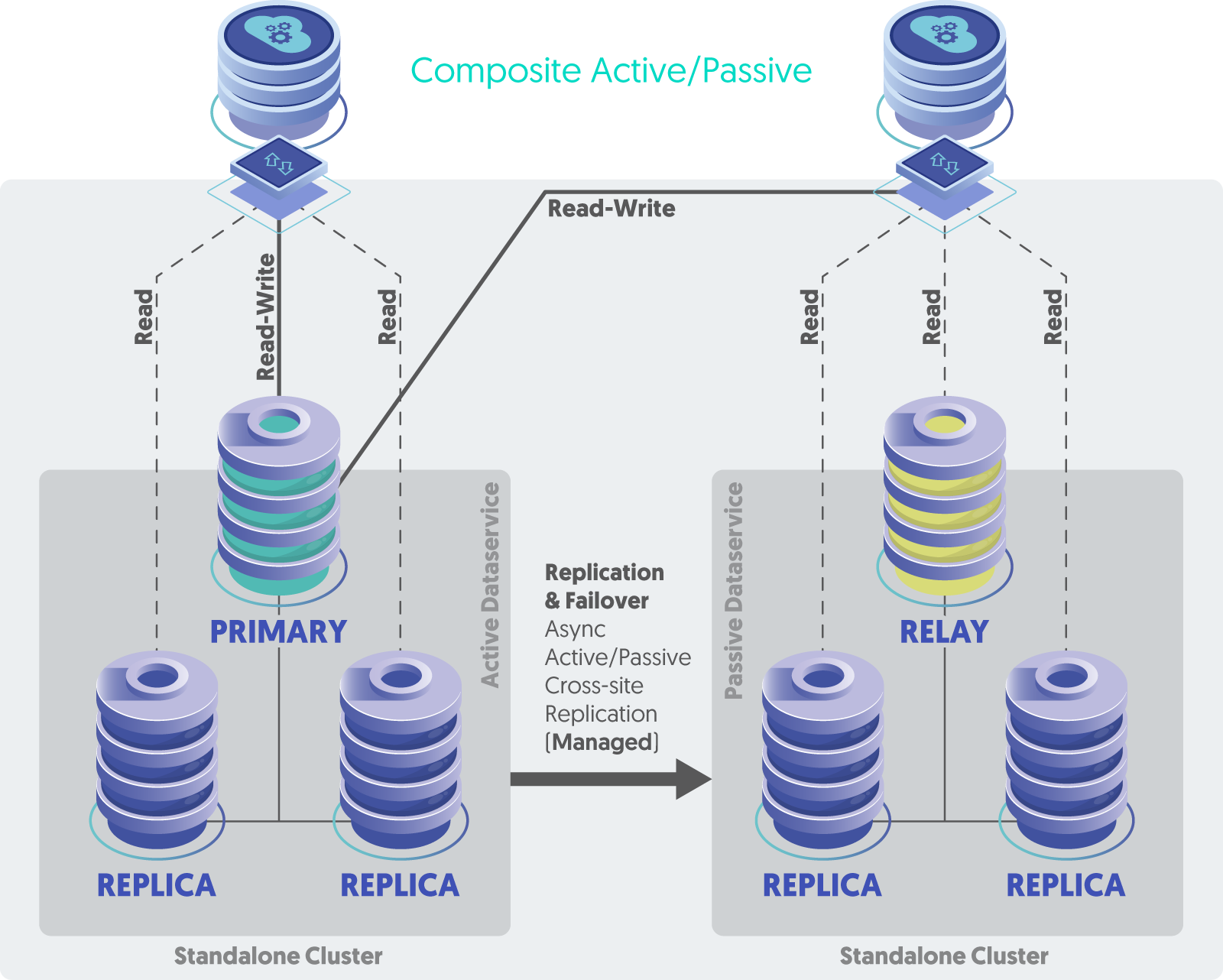
2 or more 3-node clusters, one site active, all other sites passive, manual site-level failover
https://docs.continuent.com/tungsten-clustering-7.0/deployment-composite.html
CAA
Composite Active/Active
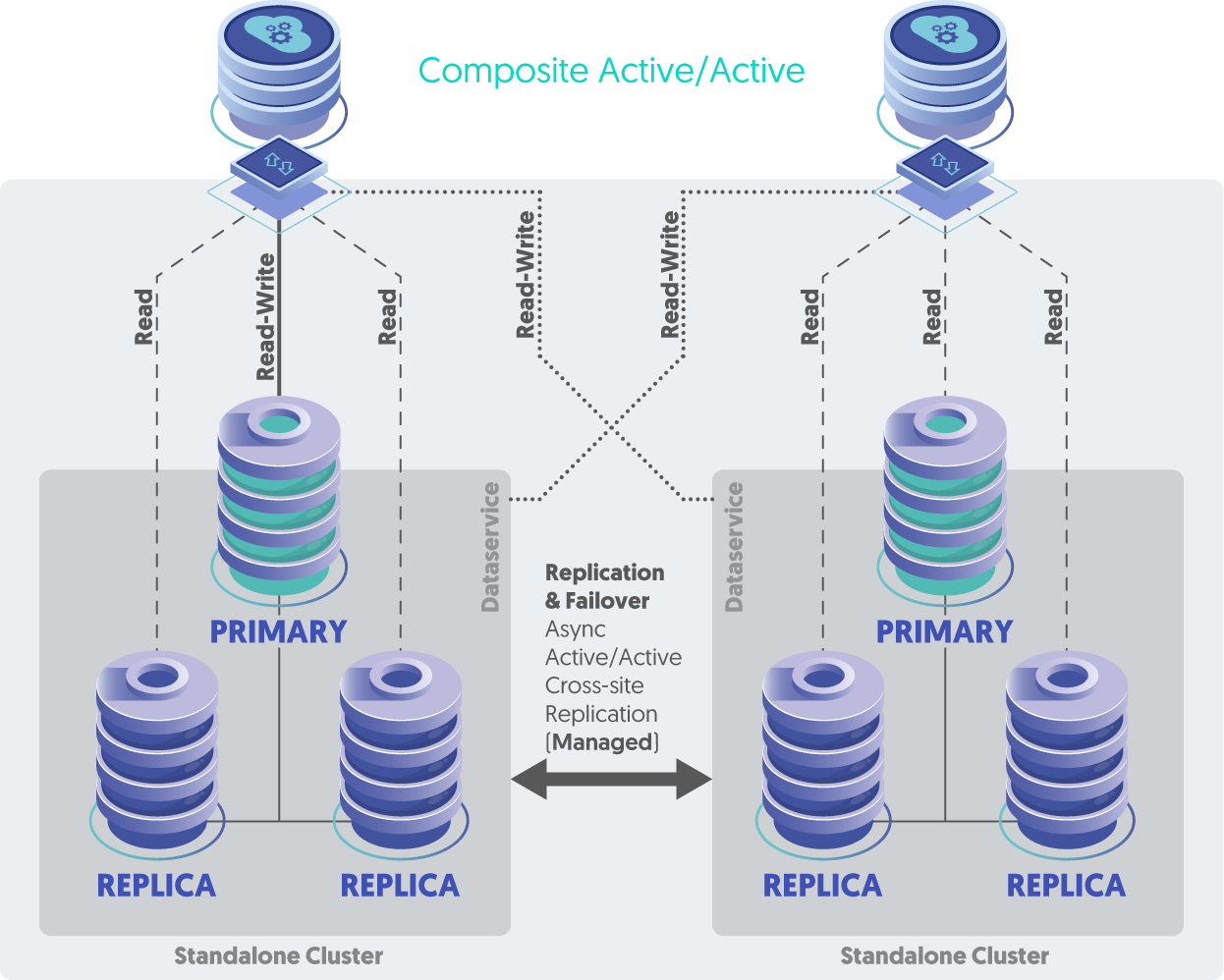
2 or more 3-node clusters, all sites active
https://docs.continuent.com/tungsten-clustering-7.0/deployment-activeactive-clustering.html
DAA
Dynamic Active/Active
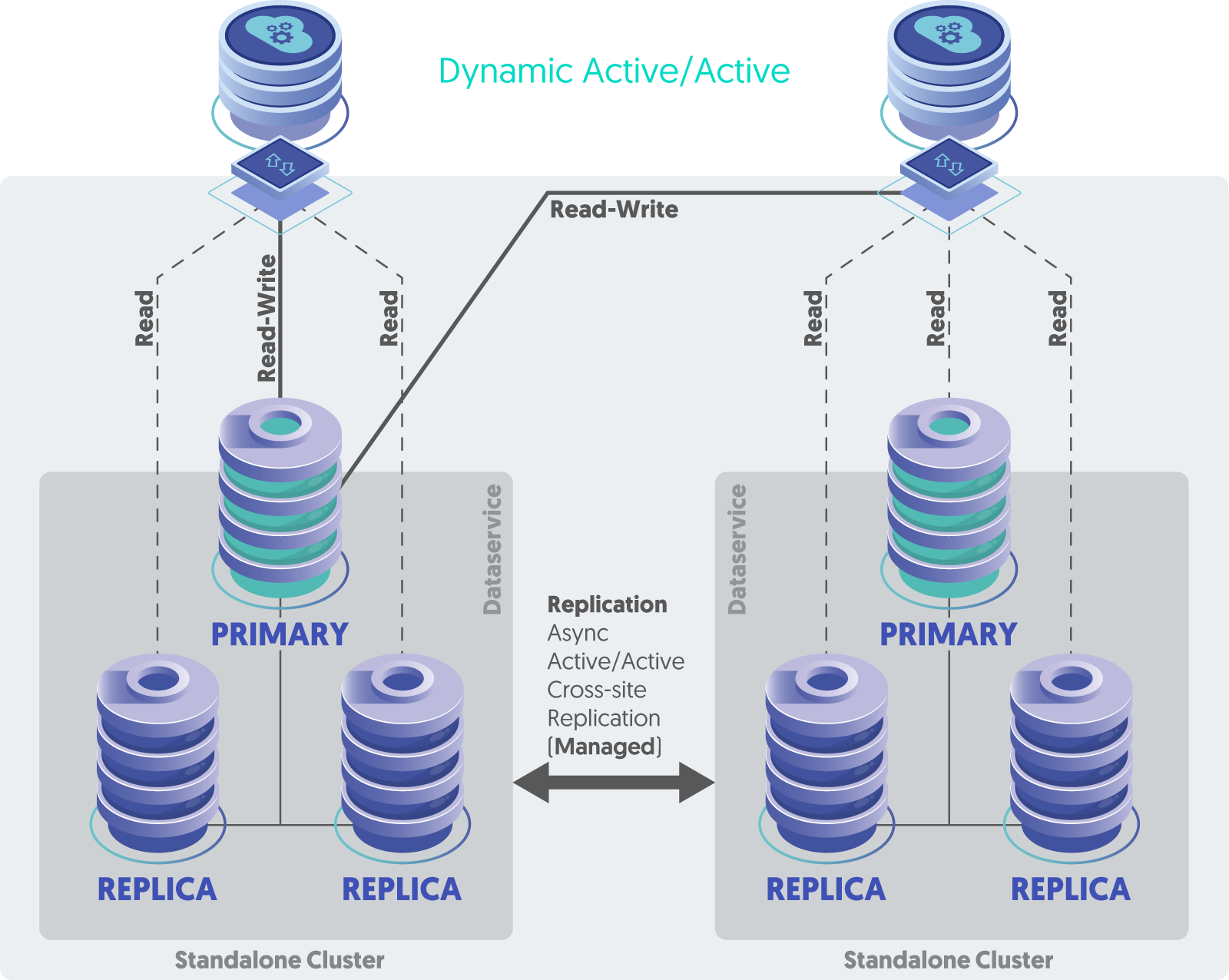
2 or more 3-node clusters, all sites active, but the Connector is configured to route all writes to a single cluster at a time, auto-failover to another site if an entire cluster becomes unavailable
https://docs.continuent.com/tungsten-clustering-7.0/deployment-dynamicactiveactive.html
DDG
Distributed Datasource Groups
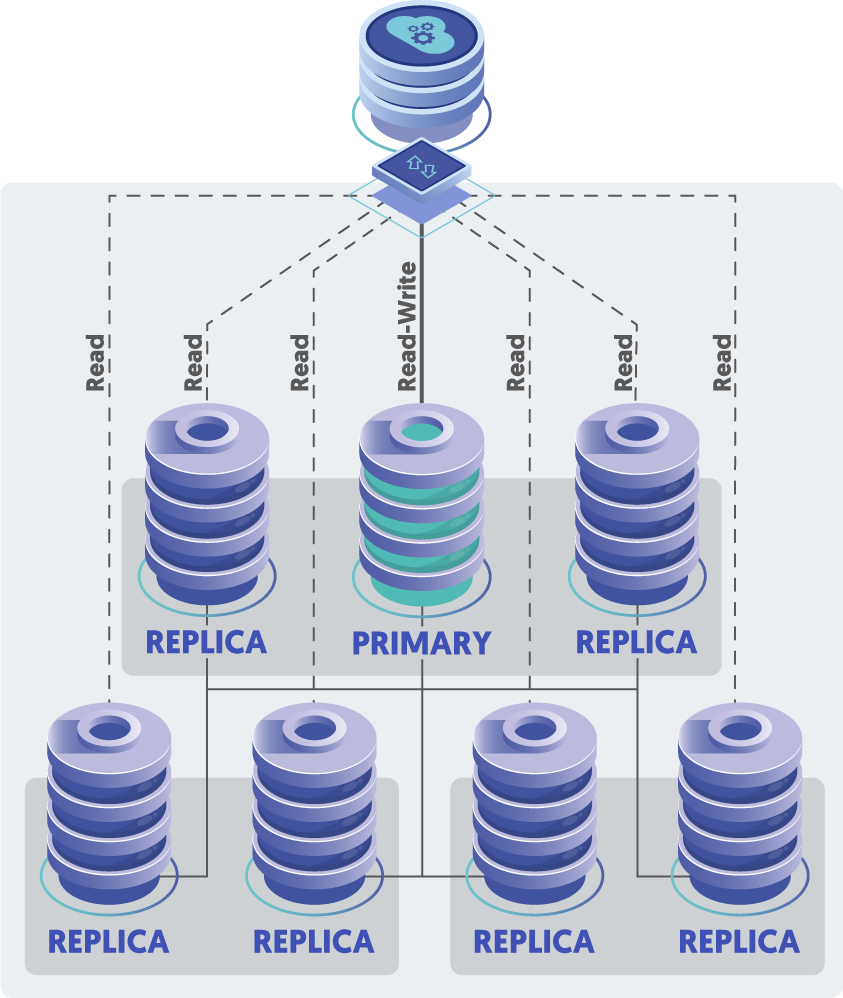
One single cluster, typically consisting of five or more nodes, always an odd number, possibly spread across more than one datacenter or region
DDG provides site-level automatic failover for the highest level of availability, and a single write Primary for data simplicity. This topology also supports MIXED-based replication for lower overhead and better performance.
https://docs.continuent.com/tungsten-clustering-7.1/deployment-advanced-ddg.html
Topologies Blog Posts
We have a number of great blog posts on this subject:
https://www.continuent.com/resources/blog/dig-and-de-mystify-tungsten-cluster-topologies
https://www.continuent.com/resources/blog/active-active-vs-active-passive-mysql-database-clustering
CAA Best Practices and Key Facts
What are the requirements for an active/active cluster (network infrastructure and replication latency)?
The requirements are similar, but there will need to be an additional port opened for a second replication stream, and some MySQL requirements:
Row based replication - this helps avoid problems due to non-deterministic SQL statements and prevent data drift between locations.
binlog-format = rowAuto-increment needs to be configured properly based on the number of clusters
auto-increment-offset = 1auto-increment-increment = 4The topology needs to be set explicitly in the INI:
[global]topology=composite-multi-mastercomposite-datasources=east,westPrimary keys on all tables (strongly recommended.
Take advantage of auto-increment keys, as described here: https://docs.continuent.com/tungsten-clustering-7.0/prerequisite-mysql.html#prerequisite-mysql-config-activeactive )
There really isn't any latency requirement for asynchronous replication
The documentation page shows the commands to use to view the status: https://docs.continuent.com/tungsten-clustering-7.1/deployment-activeactive-clustering-bestpractices.html
What level of effort is required to go from active/passive to active/active?
There is some effort involved to do it with no downtime. If you can take a maintenance window, then we could just uninstall/reinstall
How does Tungsten handle latency between the two clusters? i.e. What happens if a record is written to region A and read from region B before the DB replication happens?
Tungsten Cluster does not handle conflict resolution – that is entirely up to the application.
When using active/active, the risk of requiring re-provision of nodes is greater, with large amounts of data this may introduce significant latency to re-provision Replicas, especially if all other sites need to be rebuilt due to a data drift issue. Create a procedure or become familiar with
tprovisionto re-provision nodes, and test your procedure ahead of time.Use the InnoDB table type on all MySQL servers because without InnoDB storage engines we cannot guarantee that Replica replicators are crash safe, i.e., able to recover after either MySQL or the Tungsten Replicator fails.
Are there additional cost for an active/active cluster?
Yes, the license fee is a bit higher
Any other suggestion/considering before migrating to an active/active cluster?
The best suggestions come from the first blog. Active/Active takes a bit of planning. Please get in touch with us via https://continuent.zendesk.com/requests/new and we will help.
Monitoring and Alerting
Implement and use the Tungsten Dashboard GUI
Use the Prometheus exporters and the monitor command available from v7.0.0 onwards
Use the REST APIv2 and tap command available from v7.0.0 onwards
Implement the various Nagios and Zabbix bundled tools
https://www.continuent.com/resources/blog/monitoring-clusters-for-mysql
https://www.continuent.com/resources/blog/essential-mysql-cluster-monitoring-using-nagios-and-nrpe
Operations Best Practices
General
Before performing any operation, use
cctrl> lsto see and UNDERSTAND the state of the clusterAll OS clocks MUST be in sync using NTP and all MUST have the same timezone.
Never shun a Primary
Never have two online Primaries at the same time - that causes a cluster panic and FAILSAFE-SHUN condition
A cluster datasource will not come online automatically via the Manager until the replicator on that node has been online for the first time
The Replicator’s current position information is stored in the MySQL server in a table called
trep_commit_seqno. Use thedsctl getcommand to see the values.To get access to Tungsten command-line tab-completion and the Tungsten commands in your PATH, please source the environment file
/opt/continuent/share/env.shin your shell init script (i.e.~/.bash_profile)To perform maintenance on just one node, the best practice is to remain in Automatic mode and simply SHUN that specific node. This procedure keeps automatic failover and recovery active, keeping the risk position lower.
cctrl> datasource NODE shun
To perform maintenance on the current Primary, the best practice is to remain in Automatic mode and execute a manual
switchcommand inside thecctrlcli tool. This will move the Primary role to another node, allowing the old node to be shunned as it is now a Replica after the switch.cctrl> switchcctrl> datasource OLD_PRIMARY shun
To perform maintenance on more than one node in a local cluster then
cctrl> set policy maintenance
Cluster Logging
The default location to look for Tungsten logs is in
/opt/continuent/service_logsThe key log files to look for are:
Connector:
connector.logManager:
tmsvc.logReplicator:
trepsvc.log
Most of the files in
/opt/continuent/service_logsare symbolic links to the real log files in various sub-directories, example link targets shown below:
/opt/continuent/tungsten/tungsten-manager/log/cctrl.log/opt/continuent/tungsten/tungsten-connector/log/connector-api.log/opt/continuent/tungsten/tungsten-connector/log/connector.log/opt/continuent/tungsten/tungsten-manager/log/manager-api.log/opt/continuent/tungsten/tungsten-replicator/log/mysqldump.log/opt/continuent/tungsten/tungsten-replicator/log/replicator-api.log/opt/continuent/tungsten/tungsten-manager/log/tmsvc.log/opt/continuent/tungsten/tungsten-replicator/log/trepsvc.log/opt/continuent/tungsten/tungsten-replicator/log/xtrabackup.log
Failover Facts
Failover is immediate, and could possibly result in data loss, even though we do everything we can to get all events moved to the new Primary.
In the case of a primary failure, client connections are closed immediately, the failed node is automatically SHUNNED and the Primary role is switched to the most up to date Replica within the dataservice, which becomes the new Primary and any remaining Replicas are pointed to the newly promoted Primary.
Failover leaves the original primary in a SHUNNED state.
To make the failed Primary into a Replica once it is healthy, use either of the following:
cctrl> recovercctrl> datasource FAILED_NODE recover
While there is no specific SLA because every customer’s environment is different, we strive to deliver a very low RTO and a very high RPO. For example, a cluster failover normally takes around 30 seconds depending on load, so the RTO is typically under 1 minute. Additionally, the RPO is 100%, since we keep copies of the database on Replica nodes, so that a failover happens with zero data loss under the vast majority of conditions.
https://www.continuent.com/resources/webinars/continuent-tungsten-value-proposition
Training Video: https://www.continuent.com/resources/trainings/202-intermediate-monitoring-troubleshooting at 21:30
https://www.continuent.com/resources/blog/tungsten-cluster-how-does-failover-work-part-1-of-3
https://docs.continuent.com/tungsten-clustering-7.0/operations-primaryswitch-automatic.html
https://docs.continuent.com/tungsten-clustering-7.0/operations-status-policy-interaction.html
Advanced: https://docs.continuent.com/tungsten-clustering-7.0/manager-failover-behavior.html
Cluster Policy Modes
The Tungsten Manager is constantly executing a set of health checks and reacts to the results of those tests based on rules.
The cluster policy dictates how the cluster reacts when certain conditions are met. The policy controls if the rules are fired or not.
In Automatic policy mode, or “automatic mode” for short, any rules that are triggered are acted upon. When the cluster is in Automatic mode, failures of either the Primary or any Secondary are handled without human intervention.
In Maintenance policy mode, or “maintenance mode” for short, any rules that are triggered are ignored. When the cluster is in Maintenance mode, failures of either the Primary or any Secondary are ignored and require human intervention.
Maintenance mode should be used when administration or maintenance is required on the entire cluster, or you want automatic failover and recovery to be disabled.
Advanced: When a cluster is in Maintenance mode, a Connector will NOT pause all incoming requests if connectivity is lost with the selected Manager. This allows for safe Manager restarts and updates/upgrades without the calling application/clients being impacted.
cctrl> set policy maintenancecctrl> set policy automatichttps://www.continuent.com/resources/blog/tungsten-cluster-policies-be-automatic
https://docs.continuent.com/tungsten-clustering-7.0/operations-policymodes.html
https://docs.continuent.com/tungsten-clustering-7.0/cmdline-tools-check_tungsten_policy.html
Node State: SHUNNED
A SHUNNED datasource implies that the datasource is OFFLINE, and therefore is not connected or actively part of the dataservice.
Unlike the OFFLINE state, a SHUNNED datasource is not automatically recovered by the Manager layer.
Maintenance is best carried out while a host is in the SHUNNED state and the cluster policy is AUTOMATIC.
Datasources can be manually or automatically shunned. The current reason for the SHUNNED state is indicated in the
cctrl> lsoutput in the STATE field.cctrl> datasource SHUNNED_NODE recoverhttps://www.continuent.com/resources/blog/recently-continuent-customer-asked-part-5-state-field
Recovery
When in doubt during a Production outage or problem:
Open an Urgent or High support case at https://continuent.zendesk.com/requests/new
Use the following procedures to create the case https://docs.continuent.com/support-process/troubleshooting-support.html#troubleshooting-support-procedure
When healing a node, ensure each layer is healthy before proceeding to the next one, in order from first to last:
MySQL Server must be up and running and accepting connections, test using:
service mysqld statustpm mysql
Tungsten Replicator must be running and online, test using:
replicator statustrepctl servicestrepctl -service {svcName} qstrepctl -service {svcName} perftrepctl -service {svcName} statusNOTE: if there is only one Replicator service, there is no need to specify
-service {svcName}
The Tungsten manager must be running and the datasource (host) must be online, check with:
manager statusecho ls | cctrl
The Tungsten Connector proxy must be running and able to reach the database server, along with at least one available Primary node, and for Composite clusters, the cluster(s) must be online too. Test using:
connector statustpm connector
When healing a failed-over cluster node, use the
datasource NODENAME recovercommand NOTdatasource NODENAME onlineIf you cannot get connected through the connector, are all services online at the Composite level? - check with
cctrl -multiFor Manager Java Heap Alerts and slow Manager response times:
cctrl> set policy maintenanceOn all nodes:
shell> manager stopWhen all Managers have been stopped on all nodes, then on all nodes:
shell> manager startcctrl> set policy automatic
To re-provision (rebuild) a replica node, use the
tprovisioncommand
Command-Line Tools
Command: tpm
The tpm command is used to install, configure, upgrade and maintain Tungsten clusters. Stands for “Tungsten Package Manager”.
https://docs.continuent.com/tungsten-replicator-7.0/cmdline-tools-tpm.html
Use the
tpm mysqlcommand to connect directly to the MySQL server, only works on database nodesUse the
tpm connectorcommand to connect through the Connector proxy to get to the MySQL server, only works on nodes where the Connector is installedUse the
tpm reversecommand to see the current running cluster configurationUse the
tpm askcommand to get information about the clusterUse the
tpm ask keyscommand to get a list of available information to ask forUse the
tpm ask summarycommand to get a consolidated list of key Tungsten information (as of v6.1.14)https://docs.continuent.com/tungsten-clustering-7.0/cmdline-tools-tpm-commands-ask.html
Use the tpm firewall command to see a list of firewall ports that need to be open for the cluster to work
Use the
tpm diagcommand to generate a compressed tarball of cluster diagnostic information for upload to Continuent SupportUse the
tungsten_send_diagcommand to automatically generate and upload a diag tarball for youTo send a diag:
tungsten_send_diag --diag --case 1234To send a file:
tungsten_send_diag --file {fullpath} --case 1234https://docs.continuent.com/tungsten-clustering-7.0/cmdline-tools-tungsten_send_diag.html
Use the
tpm reportcommand to see all of the communications channels inside the cluster and their associated settings and valuesUse the
tpm policycommand to easily get and set the cluster policy, either maintenance (-m) or automatic (-a)
Command: cctrl
The cctrl command is used to control the cluster. It connects to the local Manager process, so the Manager must be started and fully initialized before cctrl will be able to connect.
https://docs.continuent.com/tungsten-clustering-7.0/cmdline-tools-cctrl.html
Use TAB to get a list of available sub-commands and to auto-complete hostnames
Use
cctrl -multiin composite clusters to be able to see remote clusterscctrl> helpcctrl> help {TOPIC}cctrl> use <TAB>cctrl> lscctrl> ls -lcctrl> cluster heartbeatcctrl> ls resourcescctrl> cluster validatecctrl> cluster topology validatecctrl> set policy maintenancecctrl> set policy automaticcctrl> ping {HOST}ADVANCED: You can get
cctrlto execute commands via a pipe:echo 'ls' | cctrlADVANCED:
shell> cctrl -output debug -multi -expert
Command: trepctl
Use trepctl commands to see the current status of the Replicator, along with the optional -r X for repeat every X number of seconds. The Replicator process must be running and fully initialized since the trepctl command connects to the local Replicator process by default.
https://docs.continuent.com/tungsten-clustering-7.0/cmdline-tools-trepctl.html
trepctl servicestrepctl -service {svcName} statustrepctl -service {svcName} qs -r 3trepctl -service {svcName} perf -r 3
Command: thl
The thl command provides access and control of the extracted events stored on disk in THL format
https://docs.continuent.com/tungsten-clustering-7.0/cmdline-tools-thl.html
Use the
thl -service {serviceName} infocommand to see a summary of all available THL on that nodeUse the
thl -service {serviceName} indexcommand to see a list of all available THL files and the sequence numbers in each fileUse
thl -service {serviceName} list -seqno {seqno} -sqlto see the contents of an event
Command: dsctl
Use the
dsctl -service {serviceName} getcommand to see the current position of the replication from the perspective of the tracking schema in the database
Command: tmonitor
https://docs.continuent.com/tungsten-clustering-7.0/cmdline-tools-tmonitor.html
To see all available Prometheus metrics
Use
tmonitor testto see all metrics with descriptions and headersUse
tmonitor -q -f ^tungsten_ testto see only the actual Tungsten-specific metrics lines
Command: tapi
The tapi command is used to interface with the Tungsten REST APIv2 from the command line.
Tungsten Connector Proxy
https://docs.continuent.com/tungsten-clustering-7.0/connector.html
To see the current Connector operating mode:
Use the
connector modecommand, as of v7.0.1Use the
tpm ask isDirectcommandUse the
tpm ask isSmartScalecommandUse the
tpm ask isBridgeModecommand
Tungsten Manager
https://docs.continuent.com/tungsten-clustering-7.0/manager.html
Use the
cctrlcommand to control the clusterUse the
cctrl -multicommand to control a Composite clusterUse the
cctrl> set policy maintenanceto set the cluster to Maintenance mode where the manager will do nothing to heal the clusterUse the
cctrl> set policy automaticto set the cluster to Automatic mode where the Manager will take actions to heal the clusterValidate the cluster with
cctrl> cluster validateValidate the cluster topology with
cctrl> cluster topology validatefrom the top-level datasourceTo change the role of a datasource, specify the role using the
cctrlcommandTo make a node the Primary:
cctrl> datasource NODENAME masterTo make a node a Replica:
cctrl> datasource NODENAME slaveTo make a node a Relay:
cctrl> datasource NODENAME relay
In MAINTENANCE mode, stopping/restarting any or all of the Managers will have zero impact on the cluster other than preventing automatic failover in the event of a MySQL Server failure; client traffic will continue to flow because the Connectors have been told to freeze state.
Tungsten Replicator
https://docs.continuent.com/tungsten-replicator-7.0/index.html
To change the role of a replicator, specify the role using the
-roleparameter. The replicator must be offline when the role change is issued.To make a node the Primary:
shell> trepctl offline; trepctl setrole -role master; trepctl online;To make a node a Replica or Relay, the URI of the Primary must be supplied:
shell> trepctl offline; trepctl setrole -role slave -uri thl://host1:2112/; trepctl online;https://docs.continuent.com/tungsten-clustering-6.1/cmdline-tools-trepctl-command-setrole.html
I Want To…
Add a new cluster to an existing CAP or CAA
Remove a cluster from an existing CAP or CAA
MySQL 8 Upgrade Guide
Tungsten Documentation:
MySQL Documentation:
Things to watch out for:
SQL_MODE changes
When replicating between lower to higher versions (MySQL 5.x to MySQL 8.x), you need to enable the
dropsqlmodefilter in your INI:svc-applier-filters=dropsqlmode
When replicating between higher to lower versions (MySQL 8.x to MySQL 5.x), you need to enable both the
dropsqlmodefilter and themapcharsetfilter, additionally you will need to configure thedropsqlmodefilter differently:svc-applier-filters=dropsqlmode,mapcharsetproperty=replicator.filter.dropsqlmode.modes=TIME_TRUNCATE_FRACTIONAL
IMPORTANT: The mapcharset MUST be removed when replicating between the same MySQL versions
Performance Tuning
Blog post about tuning an entire node:
https://www.continuent.com/resources/blog/make-it-faster-improving-mysql-write-performance-tungsten-cluster-replicasAdd
skip-name-resolve=ONtomy.cnf, and check withmysql> select @@skip_name_resolve;mysql> set mysql global variable sync_binlog = 0;on Replicas to increase write speedtungsten.ini block-commit-size=100may increase the throughput on Replicashttps://docs.continuent.com/common/performance/?_highlight=block&_highlight=comm
https://docs.continuent.com/common/cli/trepctl/service/trepctl-perflog
https://docs.continuent.com/common/performance/tuning-replicator-memory/
For MySQL <= 5.6,
mysql> set global innodb_stats_on_metadata=OFF;
tungsten.ini Examples
Example INI [default] Section
#### Basic defaults
home-directory=/opt/continuent
profile-script=~/.bash_profile
start-and-report=true
user=tungsten
mysql-allow-intensive-checks=true

#### DDG is disabled by default - update individual tungsten.ini files with value > 0 to enable
# https://www.continuent.com/resources/docs/latest/tc/deployment-advanced-ddg.html#deployment-advanced-ddg-configure
datasource-group-id=0

#### Security is enabled by default
disable-security-controls=false
# https://www.continuent.com/resources/docs/latest/tc/cmdline-tools-tpm-configoptions-c.html#cmdline-tools-tpm-configoptions-connector-ssl-capable
connector-ssl-capable=true

#### Define the application layer settings
application-port=3306
application-readonly-port=3307
application-user=app_user
application-password=goodpassword

#### Define the database layer settings
replication-user=tungsten
replication-password=goodpassword
replication-port=13306

# https://www.continuent.com/resources/docs/latest/tc/how-to-enable-database-ssl.html
datasource-enable-ssl=true
datasource-mysql-ssl-ca=/etc/mysql/certs/ca.pem
datasource-mysql-ssl-cert=/etc/mysql/certs/client-cert.pem
datasource-mysql-ssl-key=/etc/mysql/certs/client-key.pem

#### Connector Settings of Interest
connector-bridge-mode=true
connector-readonly=false

# https://www.continuent.com/resources/docs/latest/tc/connector-routing-smartscale.html
connector-smartscale=false
connector-smartscale-sessionid=DATABASE

#### Replicator Settings of Interest
#backup-method=xtrabackup
#repl-backup-online=false
#log-directory=/var/lib/mysql
#thl-directory=/opt/continuent/thl
#repl-thl-log-retention=7d
#thl-log-file-size=100000

#### Define the Prometheus exporter settings
property=manager.prometheus.exporter.enabled=true
property=replicator.prometheus.exporter.enabled=true
property=connector.prometheus.exporter.enabled=true
property=replicator.prometheus.exporter.port=8091
property=manager.prometheus.exporter.port=8092
property=connector.prometheus.exporter.port=8093

#### Define the REST API settings

## REST API user & pass
rest-api-admin-user=tungsten
rest-api-admin-pass=goodpassword

## Connector REST API Settings
connector-rest-api=true
connector-rest-api-address=0.0.0.0
connector-rest-api-authentication=true
connector-rest-api-port=8096
connector-rest-api-ssl=true

## Manager REST API Settings
manager-rest-api-port=8090
manager-rest-api=true
manager-rest-api-address=0.0.0.0
manager-rest-api-full-access=true
manager-rest-api-ssl=true
manager-rest-api-authentication=true

## Replicator REST API Settings
replicator-rest-api-port=8097
replicator-rest-api=true
replicator-rest-api-address=0.0.0.0
replicator-rest-api-ssl=true
replicator-rest-api-authentication=true
Example INI for Standalone Clusters (STA)
[alpha]
topology=clustered
master=db11
members=db11,db12,db13
connectors=db11,db12,db13,app11,app12
Example INI for Composite Active/Passive (CAP)
[alpha]
topology=clustered
master=db11
members=db11,db12,db13
connectors=db11,db12,db13,app11,app12

[beta]
topology=clustered
relay-source=alpha
relay=db21
members=db21,db22,db23
connectors=db21,db22,db23,app21,app22

[global]
composite-datasources=alpha,beta
Example INI for Composite Active/Active (CAA)
[alpha]
topology=clustered
master=db11
members=db11,db12,db13
connectors=db11,db12,db13,app11,app12

[beta]
topology=clustered
master=db21
members=db21,db22,db23
connectors=db21,db22,db23,app21,app22

[global]
composite-datasources=alpha,beta
topology=composite-multi-master
Useful Shell Aliases
These are the shell aliases I regularly use on our demo nodes. As always, Your Mileage May Vary ;-}
alias api='tapi -j '
alias atat='echo '\''select concat("R/O=",@@hostname); select concat("R/W=",@@hostname) for update;'\'' | tpm connector 2>/dev/null | grep -v '\''@@hostname'\'''
alias atatro='echo '\''select @@hostname;'\'' | tpm connector 2>/dev/null | grep -v '\''@@hostname'\'''
alias atatrw='echo '\''select concat("R/W=",@@hostname) for update;'\'' | tpm connector 2>/dev/null | grep -v '\''@@hostname'\'''
alias catdp='cat /opt/continuent/tungsten/cluster-home/conf/dataservices.properties'
alias ccls='echo ls | cctrl'
alias cclsm='echo ls | cctrl -multi'
alias cclsp='echo ls | cctrl | grep progress'
alias ccm='cctrl -multi'
alias cdb='cd /home/tungsten/bin'
alias cdd='cd /home/tungsten/diags'
alias cdg='cd /opt/continuent/generated'
alias cdh='cd /opt/continuent/share'
alias cdini='cd /etc/tungsten/'
alias cdl='cd /opt/continuent/service_logs'
alias cdr='cd /opt/continuent/releases'
alias cds='cd /opt/continuent/software'
alias cdsl='cd /opt/continuent/software/latest'
alias cdt='cd /opt/continuent/tungsten'
alias chb='echo '\''cluster heartbeat'\'' | cctrl'
alias cini='cat /etc/tungsten/tungsten.ini'
alias ini='echo /etc/tungsten/tungsten.ini'
alias isonline='check_tungsten_online'
alias loadwatch='while true; do uptime| awk -F'\''load average:'\'' '\''{print $2}'\'' ; sleep 5; done'
alias rso='replicator start offline'
alias se='source /opt/continuent/share/env.sh'
alias stamp='/usr/bin/date '\''+%Y%m%d%H%M%S'\'''
alias tca='tpm cert aliases'
alias tcg='tpm cert gen'
alias tci='tpm cert info'
alias tcl='tpm cert list'
alias tfo='tungsten_find_orphaned'
alias tin='tools/tpm install'
alias toff='trepctl -all-services offline'
alias ton='trepctl -all-services online'
alias tq='tpm query '
alias tqs='tpm query staging'
alias tqv='tpm query version'
alias treset='trepctl -all-services offline; trepctl -all-services reset -all -y; trepctl -all-services online'
alias ts='trepctl status -all-services'
alias tsa='trepctl services'
alias tsg='trepctl status | egrep stat\|appl\|role'
alias tsl='trepctl services | grep serviceName | awk -F: '\''{print $2}'\'''
alias tssg='trepctl services | egrep stat\|appl\|serviceName\|role'
alias tui='tpm update -i'
alias tun='tpm uninstall --i-am-sure'
alias tuns='tools/tpm uninstall --i-am-sure'
alias tup='tools/tpm update -i --replace-release'
alias tv='tools/tpm validate'
alias tvu='tools/tpm validate-update'
alias tvup='tools/tpm validate-update'
alias vini='vim /etc/tungsten/tungsten.ini'
alias vlisteners='vi /opt/continuent/tungsten/tungsten-connector/conf/listeners.json'
alias vumap='vi /opt/continuent/tungsten/tungsten-connector/conf/user.map'
Key Release Notes
v7.1.4 - October 1, 2024
Minor feature and bugfix release
New Feature: maskData filter - allows basic level data obsfucation capabilities, see https://docs.continuent.com/tungsten-clustering-7.1/filters-reference-maskdata.html
New Feature: The check_tungsten_progress command with now aborts with exit code 3 and displays the UNKNOWN status when run on Witness nodes, see https://docs.continuent.com/tungsten-clustering-7.1/cmdline-tools-check_tungsten_progress.html
New Feature: The tpm copy command now accepts the --install argument as an alias for --share, see https://docs.continuent.com/tungsten-clustering-7.1/cmdline-tools-tpm-commands.html#cmdline-tools-tpm-commands-copy
New Feature: The tpm purge-thl command is now Composite Cluster-aware, see https://docs.continuent.com/tungsten-clustering-7.1/cmdline-tools-tpm-commands-purge-thl.html
New Feature: The thl dsctl command has two new options: -last and -first options, see https://docs.continuent.com/tungsten-clustering-7.1/cmdline-tools-thl-dsctl.html
New Feature: The tungsten_find_orphaned command now accepts the --sql option when using the --epoch option for Scenario 2. This will output the full SQL statements instead of just the headers. For use with --epoch only. Not available with ROW-based replication, only with STATEMENT or MIXED, see https://docs.continuent.com/tungsten-clustering-7.1/cmdline-tools-tungsten_find_orphaned.html
New Feature: The tpm diag command now gathers:
the output of crontab -l
the mount and hostname commands
service_logs/tprovision.log and service_logs/trestore.log, if they exist
show global status; from the MySQL server
See https://docs.continuent.com/tungsten-clustering-7.1/cmdline-tools-tpm-commands-diag.html
Tungsten monitoring scripts no longer rely upon the bc command, removing the dependency because recent distros do not have bc available.
Global calls to sudo in tpm are now sensitive to the tpm option and alias root-command-prefix/enable-sudo-access when set to false.
v7.1.3 - June 25, 2024
4 new features, two new commands and 8 bugfixes.
Added Support: Ruby 3.2
Added Support: Oracle Linux 9
New Command: tpm check ports - tests port connectivity for standard Tungsten ports to a specified host, see https://docs.continuent.com/tungsten-clustering-7.1/cmdline-tools-tpm-commands-check.html#cmdline-tools-tpm-commands-check-ports
New Command: tpm check ini - validates all options present in a tungsten.ini file. This command can be run prior to installation, see https://docs.continuent.com/tungsten-clustering-7.1/cmdline-tools-tpm-commands-check.html#cmdline-tools-tpm-commands-check-ini
New Feature: tpasswd utility gets a new switch -C or --compare.to allowing password store file comparison for tpm update purpose, see https://docs.continuent.com/tungsten-clustering-7.1/cmdline-tools-tpasswd.html
New Feature: Tungsten Connector Kill Query Intercept - in proxy mode, kill queries are now intercepted by the connector in order to replace the given thread_id by the underlying database connection thread_id
v7.1.2 - April 3, 2024
Two new features, one new command and 9 bugfixes.
New Feature: The systemd startup scripts will now have a dependency on the time-sync service (if available) being started before tungsten components.
New Feature: Filter binarystringconversionfilter - provides a way to convert varchar data from one charset into another
New Command: tungsten_mysql_ssl_setup - creates all needed security files for the MySQL database server and acts as a direct replacement for the mysql_ssl_rsa_setup command which is not included with either Percona Server or MariaDB. This command will now be called by tpm cert gen mysqlcerts instead of mysql_ssl_rsa_setup, see https://docs.continuent.com/tungsten-clustering-7.1/cmdline-tools-tungsten_mysql_ssl_setup.html
v7.1.1 - December 15, 2023
Two new features, and some key bugfixes.
BugFix: Release 7.1.1 contains a major bug fix that prevents switches from working correctly after upgrading from v6.
Added Support: Ruby 3.x - Installations will now succeed on hosts running Ruby 3.x
v7.1.0 - August 16, 2023
6 new features, 2 new commands, and a bunch of improvements along with 18 bugfixes.
New Feature: MySQL clone can now be used as an option for recovery using tprovision, see https://docs.continuent.com/tungsten-clustering-7.1/cmdline-tools-tprovision.html
New Feature: Dynamic Datasource Groups - new topology available using the datasource-group-id TPM option. In a single cluster the nodes with the same datasource-group-id will form a Distributed Datasource Group (DDG), see https://docs.continuent.com/tungsten-clustering-7.1/deployment-advanced-ddg.html
New Feature: Tungsten Connector dual passwords - mirrors the MySQL v8.0.14+ functionality. When changing a user password, the previous password can be retained as long as needed in order to allow changing account passwords with no downtime, see https://docs.continuent.com/tungsten-clustering-7.1/connector-dual-passwords.html
New Feature: shardbyrules filter - allows rule based sharding of replication based on user confgurable rules that would allow sharding at table level, whereas previously sharding would only be handled at schema level, see https://docs.continuent.com/tungsten-clustering-7.1/filters-reference-shardbyrules.html
New Feature: Running tpm uninstall will now call tpm keep to save all of the Tungsten database tracking schemas for later use, see https://docs.continuent.com/tungsten-clustering-7.1/cmdline-tools-tpm-commands-keep.html
New Command: tpm keep - manually save Tungsten database tracking schemas in multiple formats (.json, .dmp and .cmd)for later use, see https://docs.continuent.com/tungsten-clustering-7.1/cmdline-tools-tpm-commands-keep.html
New Command: A new command tpm cert has been added to aid in the creation, rotation and management of certificates for all areas of Tungsten, see https://docs.continuent.com/tungsten-clustering-7.1/cmdline-tools-tpm-commands-cert.html
Added Support: Prometheus exporter 0.16.0 - upgraded the libraries from version 0.8.1 to 0.16.0, see https://docs.continuent.com/tungsten-clustering-7.1/ecosystem-prometheus.html
Added Support: JGroups Library v4.2.22
v7.0.3 - April 4, 2023
A new Connector advanced listeners feature has been added to the connector for even great control of client connectivity. For more details, see https://docs.continuent.com//tungsten-clustering-7.0/connector-advanced-listeners.html
Added Connector user-based authentication to existing host-based authentication to restrict connections per host and per user. For more details, see https://docs.continuent.com//tungsten-clustering-7.0/connector-authentication-host.html
A new
thl tailcommand has been added, allowing you to view the live THL changes as they are generated.The
tpmcommand now prints a warning when running as the root OS user during operations that make changes.A new command,
tpm copy-keys, has been added to assist with the distribution of security-related files after an INI-based installation. This tool requires password-lesssshaccess between the cluster nodes for the copy to work.The
tpm ask summarycommand has two new keys,isSmartScaleandisDirect, which are also available individually on the command line.The
tungsten_skip_allcommand (along with aliastungsten_skip_seqno) now shows the full pendingExceptionMessage instead of just pendingError, and the More choice shows the pendingErrorEventId and the pendingError.Increased the default manager liveness heartbeat interval from 1s to 3s
v7.0.2 - December 9, 2022
The various user-xxxx.log files are no longer generated
check_tungsten.shhas been removed (it was deprecated in v6.1.18)In CAA clusters, no longer sending write traffic to the remote site unless the local site is fully offline. In case of local failover, the connector will now pause connections until a new primary is elected. This will avoid risks of out-of-order apply after local failover
A failsafe shunned cluster (Caused by a network split) will be auto recovered after the network connection is re-established.
A new standalone status script has been added called
tungsten_get_statusthat shows the datasources and replicators for all nodes in all services along with seqno and latency.A new command
thl dsctlhas been added to show thedsctl setcommand for a given seqnoA new command set
trepctl pauseandtrepctl resumehas been addedNew logs files have been added for the REST API:
service_logs/connector-api.log
service_logs/manager-api.log
service_logs/replicator-api.log
v7.0.1 - June 13, 2022
The default value for the tpm property
repl-svc-fail-on-zero-row-updatehas been changed fromwarntostopAdded the ability to turn auto recovery on or off dynamically, removing the need to run
tpm update. This is done by running the following command:trepctl -service servicename setdynamic -property replicator.autoRecoveryMaxAttempts -value <number>Note: The service must be offline before changing the property
A new
tpm reportsub-command has been added to display all communications channels and associated states.The
thl listcommand now displays an approximative field size in bytes for row-based replication.Added a
connector modecommand to print which mode the connector is running in, either "bridge", "proxy" or “smartScale”
v7.0.0 - March 29, 2022
The
tpm diagcommand now usestar czfinstead of thezipcommand to compress the gathered files. Thezipcommand is no longer a pre-requisite fortpm diag.tungsten_set_positionhas been deprecated and no longer available in this release.dsctlshould be used instead.tungsten_provision_slavehas now been renamed totprovision
v6.1.14 - August 17, 2021
A new
tpm asksub-command has been added to display various system information