
We’re pleased to announce the release of Tungsten Dashboard v8.0.3, a usability-focused update that delivers important refinements to the user experience along with targeted bug fixes. This release continues our commitment to making Dashboard operations smoother, more intuitive, and more reliable—especially in environments where clusters and certificates change frequently.
Improved Certificate Handling
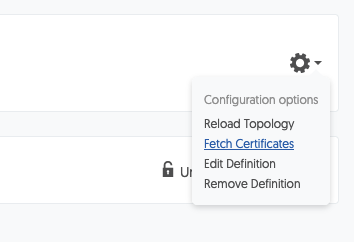
This release introduces three new ways to fetch certificates from a cluster, specifically designed to make certificate rotation easier and less disruptive. Certificates can now be retrieved directly from the Edit Cluster form using a dedicated “Fetch Certificates” button in the SSL section, from a cluster-level menu action, or automatically via a warning icon shown when a connection error is detected. These additions greatly simplify recovery after certificate changes and reduce manual intervention.
Usability & Interface Improvements
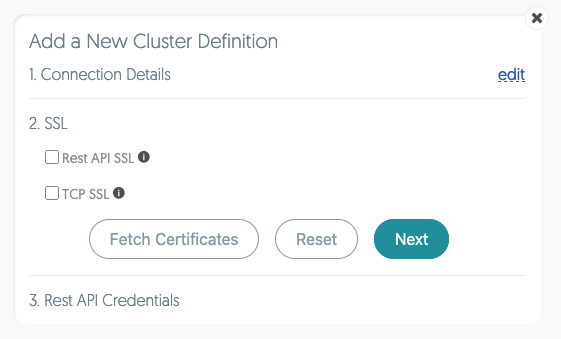
Tungsten Dashboard v8.0.3 introduces several enhancements designed to simplify everyday workflows. The Add/Edit Cluster form now includes a Reset button on each section, allowing users to quickly clear fields and start fresh without reloading the entire form. Additional UX refinements to this form make cluster configuration faster and more intuitive.
Cluster visibility has also been improved. Sorting on the Dashboard screen now mirrors the sorting settings from the Clusters screen, ensuring a consistent experience across views. Various UI positioning and styling adjustments further improve clarity and polish throughout the interface.
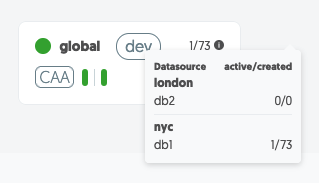
The cluster connections popup has been enhanced as well, providing clearer and more actionable information when reviewing cluster connectivity.
Bug Fixes & Stability
Tungsten Dashboard v8.0.3 also resolves several important issues. The locking mechanism for composite Active/Active clusters has been fixed, improving stability in complex topologies. In addition, a bug that could cause repeated installations to fail when generating new self-signed certificates has been corrected, making installation and reinstallation workflows more reliable.
Upgrade Notes
This release is recommended for all Tungsten Dashboard users, particularly those managing certificate rotations or working with composite cluster configurations. As always, we recommend reviewing the full release notes and validating upgrades in a non-production environment before deploying broadly.
Learn More
For full details, see the Tungsten Dashboard v8.0.3 release notes. If you have questions or would like guidance on best practices for operating Tungsten Dashboard, please contact Continuent Support or request a demo.

Comments
Add new comment